
How to Easily Restore Photos Online
Learn the image restoration process and quickly revive your old and damaged photos with Img2Go.
04. August 2024 by Bianca Palmer

Photos faithfully preserve our dearest moments. Unfortunately, over time, they can fade, become damaged, or lose their original quality.
Nowadays, preserving our memories is easier than ever, thanks to advancements in technology. One of the most effective methods of photo restoration is using AI-powered software, such as the Image Restoration tool offered by Img2Go.
Learn more about the image restoration process and how, in just a few simple steps, you can bring new life to old and damaged photos.
What Is AI-Powered Image Restoration?
AI-powered photo restoration is a cutting-edge technology that uses artificial intelligence algorithms to analyze and repair damaged or old photographs. Unlike traditional photo editing software, which often requires manual work and expertise, AI-powered restoration automates the process, making it accessible to users of all skill levels.
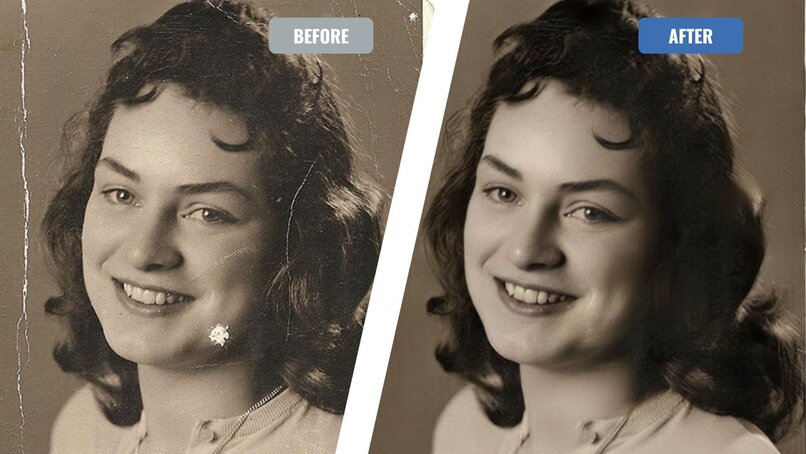
By using the power of machine learning, the tool can intelligently detect and correct many imperfections such as scratches, stains, fading, and even missing parts of the image.
How Does AI-Powered Photo Restoration Work?
The process of AI-powered photo restoration involves several steps.
First, the AI algorithms analyze the image and identify areas that need restoration. Next, the algorithms use advanced techniques to repair the imperfections while preserving the original details and colors as much as possible.
The software can also automatically adjust brightness, contrast, and color balance to enhance the overall appearance of the photo. These adjustments help create a restored image that closely resembles the original, preserving your cherished memories.
Benefits of AI-Powered Photo Restoration
- Time and Effort Saving: Automates the restoration process, reduces manual retouching, and saves time.
- Versatility: Can handle various image defects, from minor scratches to severe damage.
- Preservation of Authenticity: Maintains the historical and sentimental value of the original image.
AI Image Restoration: How to Restore Your Photos Using Img2Go?
Restoring your old and damaged photos with Img2Go is quick and easy.
- Visit Img2Go and select the Image Restoration tool.
- Upload your image by selecting a file from your device, dragging and dropping it, entering a URL, or uploading directly from Google Drive or Dropbox.
- Enable additional settings such as "Remove Scratches" to optimize the restoration process (optional).
- Click the START button.
- Download your restored image once the process is complete.

Tips for Effective AI-Powered Photo Restoration
While AI-powered Image Restoration is a powerful tool, there are still some tips and tricks that can help you achieve the best results:
- Choose a High-Quality Source Image: For optimal results, start with the highest quality original photo available. AI tools work best with high-resolution images, so if the photo is low quality or severely damaged, the restoration may be less effective.
- Experiment with Different Settings: Try different settings to see which work best for your specific photo.
- Make Manual Adjustments: While AI can automatically enhance images, manual adjustments can fine-tune the results. Use editing tools to correct any remaining imperfections and ensure the photo looks as natural and sharp as possible.
Img2Go provides a range of AI-powered tools to enhance your images.
Some of these tools include:
- Background Removal: Easily remove backgrounds from your photos to create clean, professional-looking images.
- Image Colorization: Automatically add realistic colors to black and white photos with our AI colorizer.
- Image Upscaling: Improve image resolution and sharpness, enlarging images up to 4x while enhancing details and reducing blurriness.
In Conclusion: Image Restoration
AI-powered Image Restoration is a powerful way to revive old or damaged photos. Its efficiency and accuracy make it ideal for restoring treasured memories so they can be preserved and shared for generations. With tools like Img2Go, anyone can easily restore their precious photos. Give it a try!

